Best Medium Graphic Tablets of 2026

* We independently evaluate all recommended products and services. If you click on links we provide, we may receive compensation.
Medium graphic tablets are electronic devices that allow artists and designers to create digital illustrations, animations, and designs with precision and ease. These tablets come with a stylus that is used to draw on the tablet's surface, which is pressure-sensitive and responds to the artist's hand movements. The tablets are available in various sizes, and the medium-sized ones are perfect for those who require more space to work on their designs without compromising portability. They are a popular tool among professionals and hobbyists alike, offering a digital alternative to traditional art mediums while providing a range of features and capabilities that can help enhance creativity and productivity.
At a Glance: Our Top Picks
 #TOP 1
 9.9
9.9
 #TOP 2
9.8
#TOP 2
9.8
 #TOP 3
9.6
#TOP 3
9.6
Top 4 Medium Graphic Tablets
HUION Inspiroy Frego Medium Wireless Tablet
The HUION Inspiroy Frego Tablet boasts a minimalist design, offering a clean drawing surface without physical shortcut keys. Its 10 x 6.25 inch working area is ideal for artists seeking ample space. Connectivity is flexible; you can connect via Bluetooth or USB-C, ensuring convenience whether at home or on the go. The tablet's impressive battery life allows for up to 24 hours of use on a full charge, meaning you can create without interruption. This combination of features makes it a fantastic choice for various artistic endeavours.
Wacom Intuos M Black Drawing Tablet with Pen
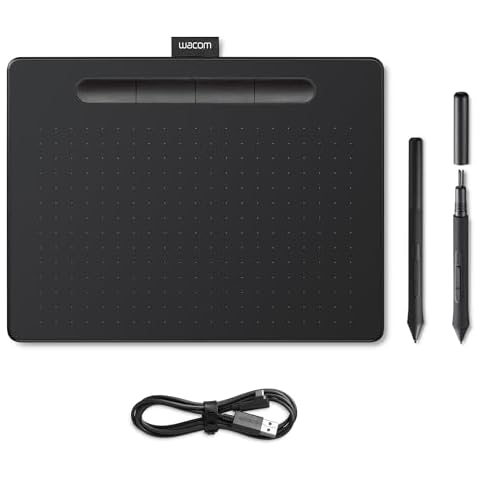
The Wacom Intuos M is an excellent drawing tablet designed for creativity and productivity. With an active area of 8.5 x 5.3 inches, it provides ample space for digital drawing, photo retouching, and even remote work. The included battery-free Wacom Pen 4K offers 4,096 levels of pressure sensitivity, ensuring that your strokes feel natural and precise. Connecting the tablet to your PC, laptop, or smartphone is a breeze via USB, making it compatible with various operating systems. Additionally, the integrated pen holder and ExpressKeys enhance your workflow, allowing you to access your favourite tools quickly.
XP-Pen Deco Pro Medium Graphics Tablet
The XP-Pen Deco Pro is a professional graphics tablet designed to enhance your creative workflow. Its outstanding double wheel interface allows you to perform multiple tasks effortlessly with one hand, minimising distractions. The tablet's impressive 60-degree tilt function ensures a natural drawing experience, responding intuitively to your hand movements. With 8,192 levels of pressure sensitivity, you gain precise control for creating fine lines and detailed artwork. The sleek design and lightweight structure make it easy to carry anywhere, providing a larger canvas for your artistic expression.
co2CREA Hard Case for Wacom Intuos 690 Series

The co2CREA Wacom Hard Case offers excellent protection for your Wacom Intuos 3D, Art, Bamboo Draw Graphics Pen Tablet, specifically fitting the 690 series models. It is shockproof, helping to guard your device against accidental bumps, and dustproof, keeping your tablet clean and clear of particles. The water-resistant feature means you can use it confidently in various environments without worry. Additionally, the handy handstrap provides easy and secure carrying, making it convenient to take your tablet anywhere. This case is lightweight yet durable, made from EVA material, ensuring your tablet stays safe on the go.

Frequently Asked Questions (FAQs)
1. What size is a medium graphics tablet?
Generally speaking, you'll want the graphic tablet size to be close to the size of your monitor. A good size to get is the Medium. For Wacom, this is around 6 by 8 inches, or around A5 size. I personally find that to be a comfortable size to work with.
2. What tablet do most graphic designers use?
Wacom Intuos Pro (PTH660) This is probably the most popular drawing tablet among graphic designers. Wacom Intuos Pro (PTH660)—good for every designer.
3. Does the size of a graphics tablet matter?
Go smaller if you need the portability or are short on desk space or budget, and go larger if you'll frequently be using large arm gestures to create digital drawings or paintings, tracing whole sheets of artwork, or want additional shortcut keys on the tablet.
4. What is the difference between a graphics tablet and a drawing tablet?
With names like those, it is no wonder most people assume they are the same thing. The main difference between a graphics tablet and a drawing tablet is that a graphics tablet requires an external screen while a drawing tablet lets you draw on the screen.
During our medium graphic tablet research, we found 43 medium graphic tablet products and shortlisted 4 quality products. We collected and analyzed 85,655 customer reviews through our big data system to write the medium graphic tablets list. We found that most customers choose medium graphic tablets with an average price of £40.99.
The medium graphic tablets are available for purchase. We have researched hundreds of brands and picked the top brands of medium graphic tablets, including HUION, Wacom, XP-Pen, co2CREA.
Kenneth Collin graduated from Imperial College, London, at 22. He is a UX/UI designer, a web developer, and a writer, amongst others. At age 14, Kenneth programmed his first app. Kenneth's app served as a remote control for censored devices. "When I was 8, I would pick up scraps from electronics and try to rebuild or at least fix them," Kenneth said in one of his recent articles on Home repairs for top gadgets.