Skip to content
Wacom feature image

Wacom

4.3

* We independently evaluate all recommended products and services. If you click on links we provide, we may receive compensation.

Products of the Wacom range from £6.48 to £1829.99, and the average price of all the products is about £189.94. So your total expense can vary depending on the products chosen, which allows you to choose products according to your budget.

Wacom offers a variety of products, there are 306 products available, 18 of which were analyzed in detail and recommended to customers. The Wacom review will examine the core factors of the brand and its products to help you make an informative buying decision.

Share

Wacom Best Sellers

Last Updated: 14 Jun 2023

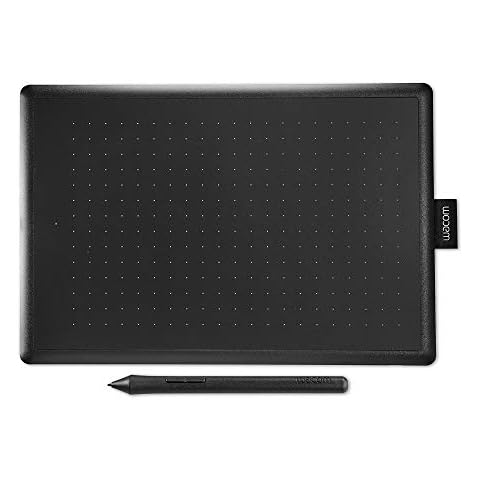
Wacom One by Wacom Medium (CTL-672-N) - Ideal for Work from Home & Remote Learning - Works With Chromebook, Black

  • Chromebook users can upgrade and accessorise their existing device with a One by Wacom tablet – a seamless plug and play connection, reintroducing handwriting for effective remote study
  • The responsive, ergonomic, pressure-sensitive pen gives you a natural feeling when sketching, drawing or annotating
  • The medium One by Wacom tablet only takes up a tiny amount of your desk, but still gives you enough space to create. It also fits easily into your bag

Wacom PTH-660-N Intuos Pro Pen Tablet (Size: M)/Medium Professional Graphic Tablet Including Wacom Pro Pen 2 Stylus with Replacement Tips/Compatible with Windows and Apple, Black

  • Thanks to the included Wacom Pro Pen 2 with 8192 pen pressure levels, 60 levels of tilt recognition in every direction, the Wacom pad ensures maximum precision and provides most natural writing feel
  • The Intuos pro medium graphics tablet by Wacom is the ideal drawing pad for digital sketching, professional graphic and fashion design as well as photo editing, 3D sculpting, illustrating and much more
  • The 8 individually adjustable ExpressKeys in combination with the customisable touch ring and the multi-touch surface offer an especially intuitive way of working and increase workflow

Wacom Drawing Glove - Glove for drawing on a graphic display (for right and left-handers, black), One Size

  • With the Wacom Drawing Glove you will achieve better results and work more efficiently. Interruptions to remove fingerprints and smears from the display are a thing of the past
  • Draw and paint on your graphic display without leaving annoying streaks and fingerprints. The Wacom Drawing Glove helps you focus only on your artwork
  • The unique fingerless design of this artist's glove enables the most natural drawing experience possible. The touchscreen and the keyboard can be used without impairment. This glove is made for everyone working on a graphic display - right and left hander, one size fits all

Wacom Cintiq 16 Creative Pen Display for On Screen Sketching, Illustrating and Drawing with 1920 x 1080 Full HD Display, Vibrant Color and Unbelievable Pen Precision, Compatible with Windows and Mac

  • Total precision: Capture every stroke with Wacom Pro Pen 2. Wacom Cintiq screen has 8192 pressure levels for precise detail. A reduced parallax means exact cursor placement at any angle
  • A powerful display: Bring ideas to life with Wacom Cintiq creative pen display. The most natural pen-on-paper feel available, vibrant colour and HD clarity. Ergonomic design for more comfortable work
  • Compatibility: Windows 7 and later, Mac OS X (10.11 and later)

Wacom One Creative Pen Display with free software (for sketching, drawing on screen, 13.3 inch full HD display (1920 x 1080), pen precision) - ideal for home office & e-learning

  • Comprehensive collection: The Wacom One combines digital pen display and first-class creative software for a seamless experience. Experience Adobe Premiere Rush, Clip Studio Paint Pro, or Bamboo Paper. Operating temperature: 5 to 40 degrees Celsius
  • Creative quick start: The Wacom One creative pen display comes with creative software. Easily switch to the larger screen on the go when connected to an Android smartphone
  • Package included: Wacom One pen display, Wacom One pen, 3 replacement tips, X-shaped Wacom One cable, AC power supply (10W), AC power plug, quick start guide

Wacom Intuos Small Drawing Tablet - Digital Tablet for Painting, Sketching and Photo Retouching with pressure sensitive pen, black - Ideal for Work from Home & Remote Learning

  • Wacom Intuos interactive remote learning is effective as being in the classroom to our new free three-month educational software trial of Collaboard, Explain Everything, Kami, Limnu and Pear Deck
  • The intuos pen tablet is the ideal creative digital accompaniment from studio to study, bedroom to beyond for all budding drawing enthusiasts, push your creativity to the edges
  • With a resolution of 2540 lpi, its active surface of 200 x 160 mm (7 Inch), four customisable express key buttons and the included stylus with 4096 pressure level, this tablet ensures maximum precision

Wacom Pro Pen 2 (KP504E) - Compatible with Intuos Pro, Cintiq, Cintiq Pro & MobileStudio Pro

  • Not compatible with Cintiq Companion, Cintiq Companion Hybrid, Cintiq Companion 2, Intuos
  • Compatible with Intuos Pro (PTH660, 660P, 860, 860P), Cintiq Pro (DTH1320, DTH1620, DTK2420, DTH2420, DTH3220), MobileStudio Pro (DTHW1320, DTHW1620, DTHW1621H), Cintiq (DTK-1660, DTK-2260)
  • International products have separate terms, are sold from abroad and may differ from local products, including fit, age ratings, and language of product, labeling or instructions.

Wacom One Pen CP91300B2Z for Wacom One Creative Pen Display

  • The cordless, battery-free pen never needs to be charged and is light and comfortable to use thanks to Wacom's EMR (Electro-Magnetic Resonance) technology
  • Pressure sensitivity and natural tilt support for more precision and control
  • Includes 3 Wacom One Pen nibs

Wacom CDS-810S Bamboo Slate Digital Notepad A4 (Letter Size), Large Smart Notebook with Digitisation Technology Including Stylus with Ballpoint Pen, Compatible with Android and Apple, Grey/Orange

  • Easy to Use: Write all your notes and sketches on the A4 notepad with the ballpoint stylus (both included), then export them to your tablet or smartphone (not included) and edit them further
  • The digital notebook by Wacom combines handwritten notes with the modern digital workplace; notes and sketches on any paper can easily be digitised and saved on a tablet or smartphone using Bluetooth
  • System Requirements: Bluetooth(4.0)-enabled iOS, Windows 10 or Android smartphone or tablet with Wacom ink space app/internet connection/maximum notepad thickness is about 80 pages (

Wacom Bamboo Ink-Active Stylus (2nd generation, with 4,096 pressure levels for natural writing & making notes on pen-compatible touchscreen devices with Microsoft Windows 10), Gray

  • Natural sensations: bamboo ink has a fine sensitive tip Offering up to 4, 096 pressure levels for sharp, accurate writing. With two customizable side buttons, It increases your productivity and efficiency
  • The best pen for your device: bamboo ink is a smart pen for writing, annotating and writing notes on tablets and stylus smartphones with Microsoft Windows 10
  • Ready to use: no pairing. Just press the Windows Ink workspace icon or your favourite app to start writing. Thanks to its long battery life of about 15 Months, you can focus entirely on your projects

One by Wacom CTL-672 Medium Drawing Graphic Tablet with Stylus Pen PC Mac

  • The natural pen experience – With its lightweight, it is comfortable enough to make drawing and painting feel natural again, just like pen and paper.
  • Digital creativity made easy – Sketch, draw and edit photos with great experience, draw your own high quality digital masterpiece!
  • Your perfect tablet – This tablet fit in perfect with your limited desktop area and your bag, and its wide-format active area allows for longer pen strokes.

One by Wacom Small Graphics Drawing Tablet 8.3 x 5.7 Inches, Portable Versatile for Students and Creators, Ergonomic 2048 Pressure Sensitive Pen Included, Compatible with Chromebook Mac and Windows

  • Advanced Electro-Magnetic Pen Technology: Bring Your project and presentations to life with precision with pen technology matching your movement with precision for control and accuracy
  • Certified Works with Chromebook: The only drawing tablet that is certified to work with Chromebook for students, teachers and creators, One by Wacom is simple to use and set-up for any project
  • Wacom is the Global Leader in Drawing Tablet and Displays: For over 40 years in pen display and tablet market, you can trust that Wacom to help you bring your vision, ideas and creativity to life

Wacom K100986 Cintiq Pro 24-4K Display/23.6 Inch Pen Display with Integrated Legs Including Pro Pen 2 Stylus with Pen Holder and Replacement Tips/Compatible with Windows and Mac, Black

  • Total precision: Capture every stroke with Wacom Pro Pen 2. Wacom Cintiq Pro screen has 8192 pressure levels for exact detail. A reduced parallax means exact cursor placement at any angle
  • Space to create: The ultimate pen-on-screen experience from Wacom Cintiq Pro. Draw on an expansive 23.6 Inch screen and see the whole picture with ease - no need to swap screens or zoom in and out
  • System requirements: Windows 7 or later, Mac OSX 10.10 or later/USB-C port (DP Alt) for ideal performance and best possible resolution or display port and USB-A, or HDMI port and USB-A/Internet

Wacom FAQs