Skip to content
Home

Verified & updated:

TV Size & Viewing Distance Calculator

Enter how far your eyes sit from the screen to find the TV sizes that fill a comfortable 30°–40° field of view, check wall or console width limits, and calculate ergonomic wall-mount height.

Viewing style
2.50 m
m
cm

Checks whether a screen physically fits your wall or niche (leaves 2" / 5 cm clearance).

cm

Typical sofa eye level is 107 cm (42") from the floor.

From 2.50 m, a 61" to 82" TV fills 30°–40° of your view — 75" sits right in the sweet spot.

Highlighted sizes fit your distance — click any size to inspect specs and mounting height:

Horizontal field of view

36.7°

Sweet spot

16:9 screen (W × H)

166 × 93 cm

65.4" × 36.8"

Screen bottom–top

60–154 cm

Centre 107 cm · Bottom 60 cm

Min TV stand & VESA

≥ 176 cm

VESA 400×300 / 400×400 mm

Wall elevation & eye-level mount 75" (16:9)
60 cm 107 cm 166 cm
Top-down viewing angle 36.7°
36.7° 2.50 m
  • 4K sharpness: at this distance, 20/20 vision starts seeing extra 4K detail over 1080p above roughly 63". On a 75" screen, 4K remains noticeably sharper up to 2.97 m.
  • Wall-mounting a 75" TV: align the screen centre near 107 cm from the floor, putting the bottom edge around 60 cm (leave 8–10 cm / 3–4" below if placing a soundbar on a TV unit).

TV size chart: 16:9 dimensions, viewing distance & VESA

Visible 16:9 screen dimensions (excluding outer bezel and stand), recommended 40° (immersive cinema) to 30° (mixed everyday viewing) seating distance, common VESA mounting patterns, and typical panel weights.

TV size chart: 16:9 dimensions, viewing distance & VESA
TV Size Width Height Area 30°–40° Dist. VESA Weight
32" 71 cm (27.9") 40 cm (15.7") 0.28 m² 0.97–1.32 m 100×100 / 200×200 mm 4–6 kg
40" 89 cm (34.9") 50 cm (19.6") 0.44 m² 1.22–1.65 m 200×200 mm 6–9 kg
43" 95 cm (37.5") 54 cm (21.1") 0.51 m² 1.31–1.78 m 200×200 mm 7–11 kg
50" 111 cm (43.6") 62 cm (24.5") 0.69 m² 1.52–2.07 m 200×200 / 300×300 mm 11–15 kg
55" 122 cm (47.9") 68 cm (27.0") 0.83 m² 1.67–2.27 m 300×200 / 300×300 mm 14–20 kg
65" 144 cm (56.7") 81 cm (31.9") 1.16 m² 1.98–2.69 m 300×200 / 400×300 mm 20–28 kg
75" 166 cm (65.4") 93 cm (36.8") 1.55 m² 2.28–3.10 m 400×300 / 400×400 mm 29–39 kg
77" 170 cm (67.1") 96 cm (37.8") 1.63 m² 2.34–3.18 m 300×200 / 400×200 mm 25–34 kg
83" 184 cm (72.3") 103 cm (40.7") 1.90 m² 2.52–3.43 m 400×400 mm 34–44 kg
85" 188 cm (74.1") 106 cm (41.7") 1.99 m² 2.59–3.51 m 400×400 / 600×400 mm 40–57 kg
98" 217 cm (85.4") 122 cm (48.0") 2.65 m² 2.98–4.05 m 600×400 / 800×400 mm 54–73 kg
100" 221 cm (87.2") 125 cm (49.0") 2.76 m² 3.04–4.13 m 600×400 / 800×400 mm 59–77 kg

Proportional TV screen comparison (43" to 98")

Click any size to highlight its exact 16:9 footprint and compare real screen-area growth.

98" 85" 75" 65" 55" 43"

43" → 55"

+64%

55" → 65"

+40%

65" → 75"

+33%

75" → 85"

+28%

85" → 98"

+33%

Outlines are drawn to exact 16:9 glass proportions from a shared origin, without bezels or stands. Because screen area scales with the square of the diagonal, stepping from 55" to 65" adds 40% more visible area — not 18%.

How TV size is measured — and why 10 extra inches is a massive jump

Every advertised TV size is the diagonal measurement of the visible glass from one corner to the opposite corner, excluding the bezel and stand. Most sets are sold as a "class" size: a 65-inch-class TV commonly measures 64.5 inches corner-to-corner, while a 55-inch class measures 54.6 inches.

Because modern TVs use a fixed 16:9 aspect ratio, width is always about 0.872× the diagonal and height is 0.490× the diagonal. What surprises most buyers when unboxing a larger TV is surface area: screen area grows with the square of the diagonal. Moving from 55" to 65" adds 18% to the diagonal, yet delivers 40% more screen area — immediately changing how cinematic movies, subtitles, and split-screen sports feel.

Real screen-area jump between popular TV sizes
Upgrade Step Diagonal Width Gain Area Gain Real-World Impact
43" → 55" +12" +10.4" (+26 cm) +64% Bedroom monitor feel to proper small-living-room TV
55" → 65" +10" +8.7" (+22 cm) +40% Largest value jump per inch in mainstream living rooms
65" → 75" +10" +8.7" (+22 cm) +33% Crosses into home-theater immersion at 8–10 ft (2.5–3.0 m)
75" → 85" +10" +8.7" (+22 cm) +28% Fills large open-plan rooms; check doorway & stairwell turns
85" → 98" +13" +11.3" (+29 cm) +33% True projector-replacing wall scale; requires two-person freight delivery

Viewing distance standards explained: SMPTE 30°, THX 40°, and modern 4K cinema

Human horizontal vision spans roughly 200°. How immersive — or fatiguing — a TV feels depends on what share of that visual field the screen fills, known as horizontal field of view (FOV). Two long-standing engineering benchmarks anchor nearly every sizing chart, plus a newer 4K enthusiast target:

SMPTE 30° — Mixed everyday TV, sports & gaming

Outlined in SMPTE EG-18 and used as the baseline by test labs like RTINGS, a 30° FOV (roughly distance ÷ 1.6) keeps the entire frame inside comfortable central vision. Choose near 30°–33° if you watch fast-moving soccer or hockey, rely heavily on subtitles, or play competitive shooters where glancing at corner HUD gauges matters.

THX 36°–40° — Immersive movie & HDR sweet spot

THX certifies cinema back rows at 36° and recommends 40° (roughly distance ÷ 1.2) for home theater seating. At 40°, widescreen 2.39:1 movies with black letterbox bars still feel enveloping, and subtle actor expressions in modern 4K wide shots come through clearly.

CEDIA 45°–50° — Dedicated 4K dark-room theater

Modern high-performance home theater designers and cinema calibrators often design dedicated 4K rooms closer to 45°–50°. Because 4K UHD packs four times the pixels of 1080p, sitting closer works cleanly for film watching — though beyond 50°, fast camera pans, subtitles, and HUD edges start forcing constant head or eye movement.

Too far (< 25°) — The most common buyer regret

Legacy HDTV habits (like putting a 55" TV 10–12 ft / 3.0–3.6 m away) shrink the screen below 22° FOV. At that distance, subtitles look cramped, HDR highlights lose punch, and upgrading to a sharper 4K panel delivers almost zero visible benefit over a larger mid-tier screen.

4K vs. 1080p vs. 8K: when viewing distance erases extra pixels

Display sharpness is governed by human visual acuity, not marketing labels. Under ITU-R BT.2100 (the international UHD/HDR reference standard), a viewer with normal 20/20 vision resolves details down to about 1 arc-minute (1/60 of a degree). That translates directly into screen-height (H) multiples:

  • 1080p HD (3.0H): At three times the screen height (around 8 ft / 2.4 m for a 65" TV), individual 1080p pixels blend into a continuous image.
  • 4K UHD full acuity (1.5H): To resolve every single pixel on a 4K screen, your eyes need to be around 1.5× the screen height (~4 ft / 1.2 m on a 65" TV).
  • Noticeable 4K benefit over 1080p (~3.1H / 1.55× diagonal): Between 1.5H and ~3.1H (roughly 4 to 8.5 ft / 1.2 to 2.6 m on a 65" TV), 4K looks visibly crisper than 1080p. Sit farther back than ~1.6× the diagonal and extra pixel count disappears — HDR contrast, local dimming, color volume, and screen size become the only upgrades your eyes actually see.
  • What about 8K? On an 85" screen, resolving 8K over 4K requires sitting closer than roughly 3.5–4.5 ft (1.1–1.4 m) — impractical for normal living rooms, and native 8K broadcast/streaming content remains scarce.

How high to mount a TV (and the fireplace trap)

Mounting a TV too high is the single most common living-room ergonomics mistake. The baseline rule is simple: place the vertical center of the screen at seated eye level — roughly 42 inches (107 cm) from the floor on a typical sofa, or slightly lower (38–40" / 96–102 cm) on deep, low-slung lounge couches.

As TVs get larger, the bottom edge moves closer to the floor to keep the center at eye level. A 55" TV centered at 42" sits 28.5" (72 cm) off the floor, whereas an 85" TV centered at 42" drops its bottom edge to 21" (54 cm) — meaning tall 32-inch dressers or media cabinets push big TVs far too high.

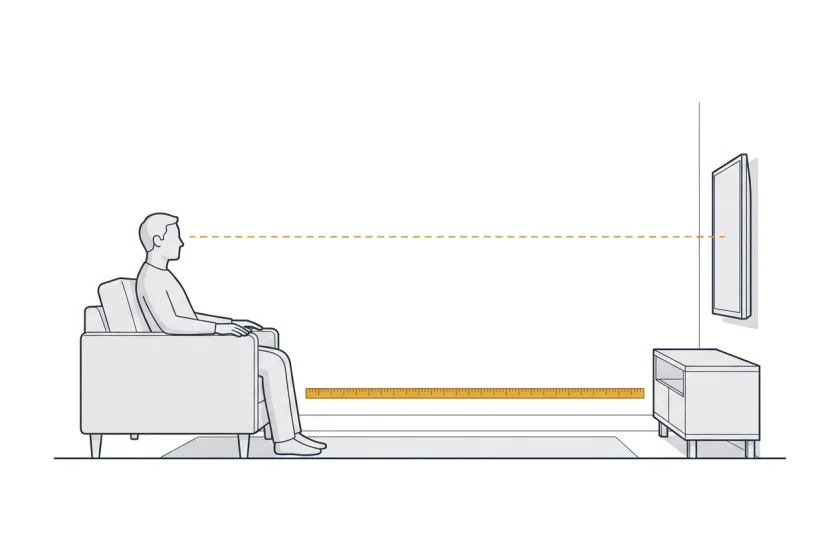
Side-profile living room diagram showing seated eye-level sightline aligned horizontally with the vertical center of a wall-mounted TV and floor-to-eye viewing distance.
Ergonomic mounting benchmark: align the vertical center of the screen horizontally with seated eye level (~42 in / 107 cm) and measure straight-line distance from eyes to screen.
Ergonomic wall-mount heights & recommended TV stand widths (42" / 107 cm seated eye height)
TV Size Screen Height Bottom Edge (42" center) Ideal Console Height Min Console Width
43" 21.1" (54 cm) 31.5" (80 cm) 24–28" (60–71 cm) ≥ 41" (105 cm)
55" 27.0" (68 cm) 28.5" (72 cm) 20–25" (51–64 cm) ≥ 52" (132 cm)
65" 31.9" (81 cm) 26.1" (66 cm) 18–23" (46–58 cm) ≥ 61" (154 cm)
75" 36.8" (93 cm) 23.6" (60 cm) 16–21" (41–53 cm) ≥ 69" (176 cm)
85" 41.7" (106 cm) 21.2" (54 cm) 15–19" (38–48 cm) ≥ 78" (198 cm)

Room brightness & seating layout: OLED vs. Mini-LED trade-offs

Two TVs of the exact same size can look completely different depending on windows, curtains, and couch shape. Before finalizing a size, check how your room interacts with modern panel types:

Bright living rooms with opposing windows

High-brightness Mini-LED / QLED LCD TVs fight daytime glare better and sustain much higher full-screen brightness for sports and daytime news. Prioritize models with strong anti-reflective coatings over chasing absolute dark-room black levels.

Light-controlled rooms & wide L-shaped sectionals

OLED panels (WOLED and QD-OLED) offer pixel-level contrast with zero blooming around subtitles and stay accurate even at 45°–60° off-axis seating angles. Many budget and mid-range VA-panel LCDs wash out color and contrast when viewed from side seats on a wide sectional.

4-step pre-purchase measuring checklist

  1. 01. Measure eyes-to-screen, not couch front to wall: Sit normally (or reclined if you use recliners) and measure from where your head actually rests to the exact plane of the TV. Leaning back into a deep sofa easily adds 1–2 feet (30–60 cm).
  2. 02. Check stand foot spacing, not just total TV width: Many 65"–85" TVs use wide-set edge feet rather than a central pedestal. Verify the stand width in the model spec sheet — a 65" TV (~57" wide) with outer feet will overhang a 50" console unless the model offers a narrow center-foot slot.
  3. 03. Verify VESA pattern, wall structure, and weight: Screen size alone does not fix VESA bolt spacing — two 65" TVs can use 300×200, 400×300, or 400×400 mm. Match the mount to both the VESA pattern and panel weight, and use proper anchors for US 16" wood studs or European masonry/brick walls (never hang a 55"+ TV on hollow drywall alone).
  4. 04. Measure doorways, elevators, stairs, and your car against the shipping box: A TV carton typically runs 6–9 inches (15–23 cm) wider and taller than the TV itself. A 75" box (~73" × 44" / 185 × 112 cm) rarely fits inside a midsize SUV and can jam on tight European apartment stairwells.

Frequently asked questions

At 8 ft (2.4 m), a 65" TV gives a balanced 33° FOV (great for mixed TV, sports, and gaming), while a 75" TV reaches 38° (true cinema immersion). At 9.5–10 ft (2.9–3.0 m), a 65" drops below 28°, making 75" the clear winner if your wall and budget allow it. Most buyers who split the difference wish they had gone up a size after a week.

How this works

All screen geometry, field-of-view angles, and visual-acuity distances are computed directly from exact 16:9 trigonometry and published engineering standards — no rough lookup approximations.

16:9 screen width
Exact 16:9 diagonal geometry equals 0.8716 × screen diagonal.
16:9 screen height
Exact 16:9 diagonal geometry equals 0.4903 × screen diagonal.
Horizontal viewing angle
Calculated from exact screen width and seating distance to evaluate 30° (SMPTE), 35° (balanced), and 40° (THX cinema) sightlines.
4K vs. 1080p acuity limit
For 20/20 vision, finer 4K detail remains distinguishable closer than 3.18× screen height (about 1.56× screen diagonal).
  • Viewing distance targets use 30° (SMPTE EG-18 mixed viewing), 35° (balanced midpoint), and 40° (THX home-theater immersion).
  • Optional wall-width fit reserves 2 inches (5 cm) of total clearance so the bezel and side cable ports do not scrape an alcove.
  • Recommended console width adds 4 inches (10 cm) over visible screen width; always verify outer-foot spacing on wide-leg models.
  • Wall-mount bottom and top edges center the panel at your seated eye height (Eye Height ± H / 2).

Sources & standards

More Home tools

All tools

Related tools